

Already have a PDF? Upload it and Mailavo reads every address, presorts for the deepest USPS discounts, and routes to a matched print partner. Starting from scratch? Use Compose to pair a template with a contact list and generate every addressed piece automatically. No broker. No phone calls. No surprises.

Whether you're mailing statements, marketing pieces, or taking on overflow print jobs — Mailavo handles both sides of the transaction.
Upload a postcard/letter template + mailing list and we handle the rest — accurate mail merge, printing, and USPS-compliant mailing with postal discounts. Or, upload a print-ready PDF of statements, invoices, or letters and Mailavo automatically reads every address and prepares it for mailing — CASS/NCOA cleaning, presort discounts, print production, and tracking. Transparent pricing and timelines, no mail house required.
Give your customers a fully white-labeled online direct mail portal — branded as yours. They can upload designs, build personalized campaigns with Compose, get instant pricing, and place orders 24/7. It looks and feels like your own service.
At the same time, Mailavo routes you new customers that match your equipment, paper stocks, and current capacity. No sales effort. No broker fees. Just consistent work and fast payouts powered by Stripe.
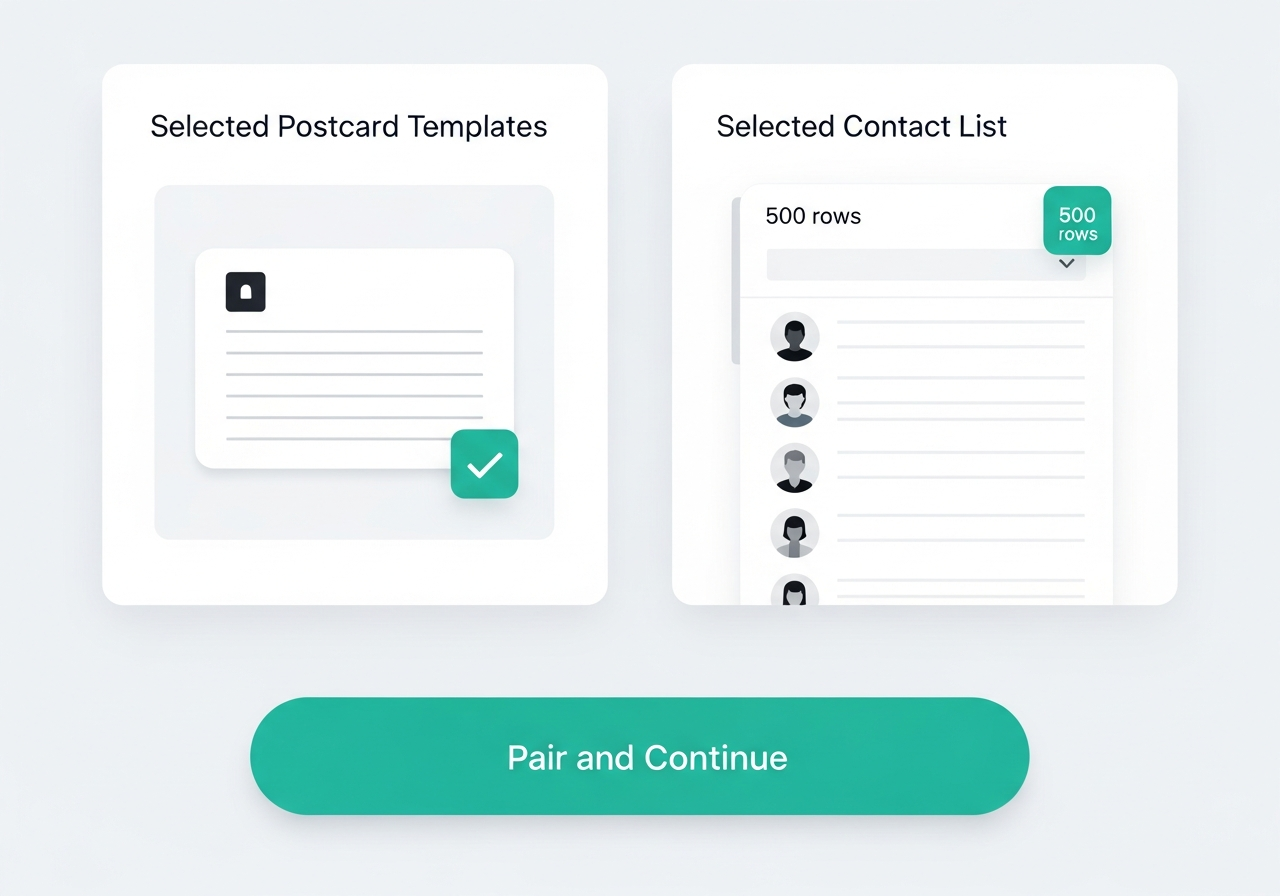
Compose lets you build a personalized mailing from scratch. Upload a postcard or letter template, add your contact list, place the address block once, and Mailavo generates an addressed mailpiece for every recipient — ready to presort and send.
Addresses exported from billing systems, ERPs, and CRMs rarely arrive in a clean, maileable format. Units get buried in the street field. City and state land on the same line — or get split across two. The same person shows up twice under slightly different spellings. Most of the time you don't know the problems are there until pieces come back or you realize you mailed someone twice.
Mailavo's Address Cleanup tool parses every raw address into its structured components, standardizes formatting to USPS mailing conventions, detects duplicates, and scores your entire list before a single piece is submitted. You see exactly what will mail — and what won't — before you spend anything.
What Mailavo's address engine does to your list
Every address is broken into its components — street number, street name, unit type and number, city, state, ZIP. The parser handles multi-line splits, units buried in the street field, and encoding artifacts from any export format. Ambiguous records are automatically cross-checked against the USPS Address Validation API.
Parsed addresses are formatted to USPS mailing standards — proper case with rules that handle entity suffixes (LLC, MD) and name particles correctly. Then duplicates are detected by normalized street and ZIP and grouped, so you never print or pay postage for the same recipient twice.
Your list gets an overall quality percentage. Every row gets a status: Clean, USPS Fixed, Duplicate, or Parsed Fail. Fix failures inline, trigger a manual USPS lookup, or exclude the row — before anything goes to presort or print.
Traditional mail houses profit from what you can't see — bundled margins, inflated postage rates, and quotes that arrive after you're already committed. Mailavo works differently. Upload your PDF and see the exact cost before you approve anything: USPS presort discounts calculated piece by piece in real time, print cost itemized, every fee on the table. Confirm the numbers. Click send.
Mailavo reads address data directly from your PDF and runs CASS/NCOA validation followed by USPS presort logic — 5-Digit, 3-Digit, AADC, and Mixed AADC — so every mailpiece gets the lowest applicable postage rate before the job is submitted.
Every job shows a line-by-line cost breakdown — print cost per piece, presorted postage per piece, envelope, and any additional sheet fees — before you confirm. Pay by credit card or ACH, and track every job and credit purchase in your billing dashboard.
Invite teammates, assign admin roles, and set up multiple mailing accounts under one organization. Separate departments, separate mail permits, or shared billing — all managed from one place with no user limits.
How It Works
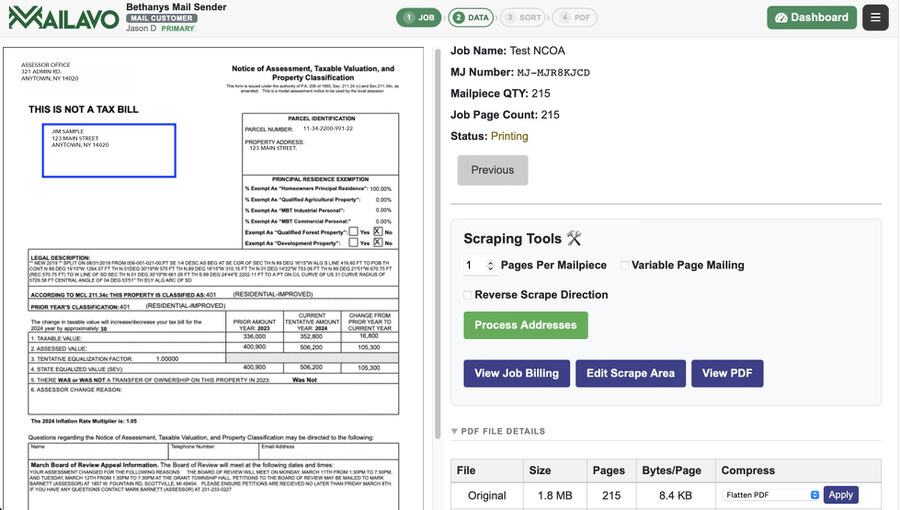
If your billing system, ERP, accounting software, or design tool outputs a ready-to-print PDF — you're ready to mail. Mailavo reads the address block directly from each page. No separate spreadsheet, no mail merge, no reformatting.
Upload a single multi-page PDF or a ZIP of single-page PDFs
Address data is parsed automatically from each mailpiece
Add inserts or backers to accompany each letter
Choose simplex or duplex, B&W or color, envelope size
Save Job Profiles to reuse settings on future mailings
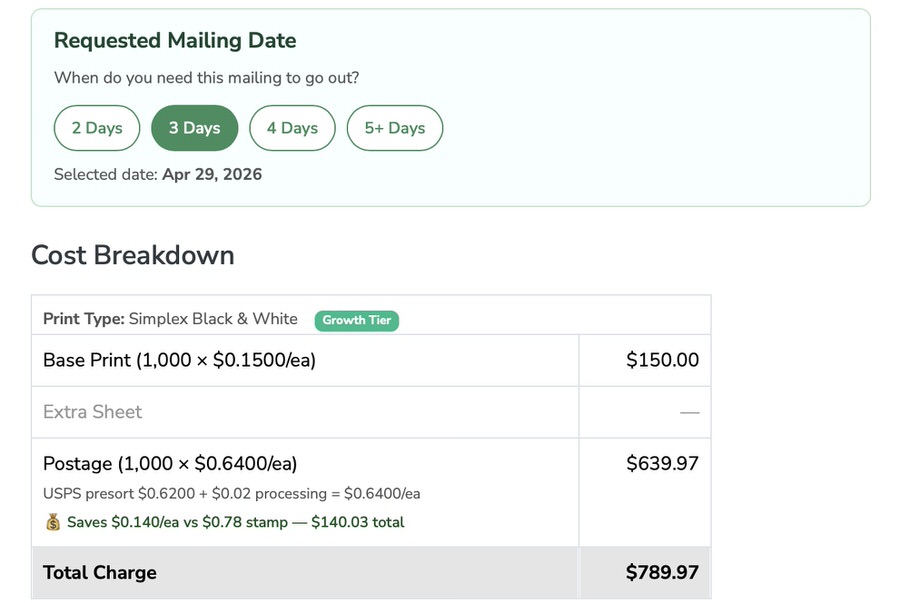
Every job shows you a line-by-line cost breakdown — print cost per piece, postage per piece (after presort discounts), and any additional sheet fees — before you confirm. Your account balance is debited only when you approve.
Your billing dashboard tracks every job, every credit purchase, and cumulative postage savings over time. Share account access with teammates or finance without sharing your login.
Create a free account, upload your PDF, and see your exact postage and print cost before you commit to anything.
Mailavo routes jobs to print partners automatically — based on your equipment, paper stocks, and capacity. Earn consistent revenue from overflow work with no sales effort required.
Pricing
Presorted USPS rates run 15–25% below retail First Class — for many customers, that difference alone offsets a significant portion of the monthly plan cost. Each plan gives you a monthly credit pool: run one job or twenty, and every mailing that month draws from the same credits at your plan's flat rate.
1,000 credits per month — mail daily or on demand, every piece at $0.29
Monthly Credits : 1,000
Print Cost Per Piece : $0.29 ea*
Turnaround SLA : 96 hours
5,000 credits per month — mail on any schedule, every piece at $0.22
Monthly Credits : 5,000
Print Cost Per Piece : $0.22 ea*
Turnaround SLA : 72 hours
25,000 credits per month — unlimited cadence, every piece at $0.16
Monthly Credits : 25,000
Print Cost Per Piece : $0.16 ea*
Turnaround SLA : 48 hours
* Print cost per piece based on one single-sided color page in a #10 Large Window Envelope. Duplex, B&W, and multi-page pricing available in-app.
** Monthly plan price covers print credits only. USPS postage is billed separately at your actual presorted rate — always below retail First Class.
Need more than 25,000 pieces or a custom mailpiece spec? Contact us for a custom quote.
One credit covers the print and processing cost for one standard mailpiece (single-sided color, #10 envelope). Multi-page pieces, duplex printing, or additional inserts use a proportional number of credits. You can see the exact credit cost for any job before confirming it.
No — postage is billed separately and charged at your actual USPS presorted rate, which is always lower than retail First Class. Mailavo shows you the exact postage cost before you submit the job, so there are no surprises. Postage is paid from your credit balance.
After uploading your PDF and defining the address block location, Mailavo runs CASS/NCOA on every address and then presorts your list. Each piece is individually rated at 5-Digit, 3-Digit, AADC, or Mixed AADC — whichever discount applies. You see the resulting per-piece postage rate before you commit.
Yes. If your system outputs a ready-to-print PDF — bills, statements, invoices, notices — you can upload it directly. For automated workflows, Mailavo also supports SFTP feeds and API integrations to pull files from your system automatically on a schedule.
Every job has a cost summary broken down by print cost, postage, and any additional sheet fees. Your account dashboard shows total spend, credits used, and cumulative postage savings per job — so you can see exactly what you're saving versus retail rates.
Mailavo accepts credit cards (2.9% + $0.30 Stripe fee) and ACH bank transfers. ACH processing fees are absorbed by Mailavo — your full payment is applied to your credit balance. Credits do not expire and roll over month to month.
All data is transmitted over TLS. Each customer's data is stored in a dedicated, isolated database schema — completely separate from other accounts. You can configure custom data retention periods in your account settings to control how long files are kept on our servers.
There is no limit. You can invite team members, assign admin roles, and set up multiple mailing accounts under one organization — useful for companies with separate departments, multiple mail permits, or different billing accounts.
Yes. Mailavo can mail to any country that USPS provides international service to. International postage rates apply and are shown before you confirm the job — the same transparent cost review as domestic mailings.
Whether it's about pricing, print partnerships, or how Mailavo works — send us a message and we'll get back to you within one business day.